Large-Scale Acoustics Analysis with "ANSYS Workbench" and "WAON"
Outline
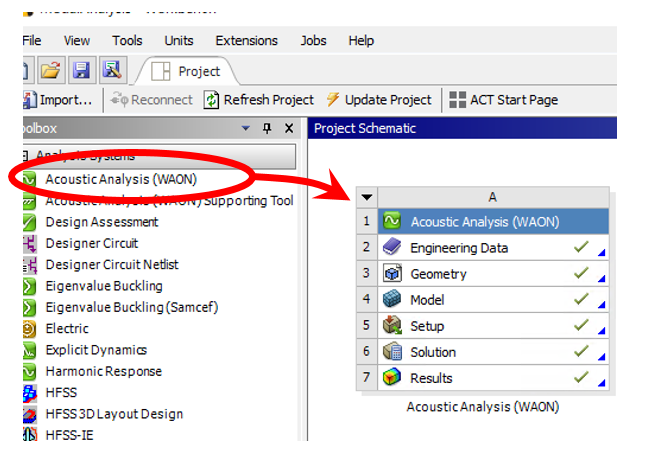
"WBtoWAON" is a specialized interface for ANSYS Workbench, which is included in the standard package of "WAON", large-scale acoustics simulation software. With this interface, you can easily export geometries and simulation results from ANSYS Workbench to WAON.
Advantages of "WBtoWAON"

Enlarge
- Direct interface for ANSYS Workbench
The simulation process is simple, because WAON uses native data of ANSYS Workbench (meshes and the result of simulation) for acoustics simulation.
- Highly effective for large-scale acoustic problems
WAON is particularly effective for large-scale and high-frequency problems which you may find difficult to do with FEM tools, such as ANSYS. On a 32-bit Windows machine (memory: 2GB) , a model with 60,000 degrees of freedom (DOF) can be solved; and on a 64-bit Windows machine (memory: 8GB) , the solvable DOF is 250,000.
- The surface structure consists of shell meshes
WAON applies the boundary element method (FMBEM or BEM), which models only the surface of a structure with shell meshes. Therefore it requires far less elements than FEM, which models whole of the acoustic medium.
Analysis Case
Analysis Model
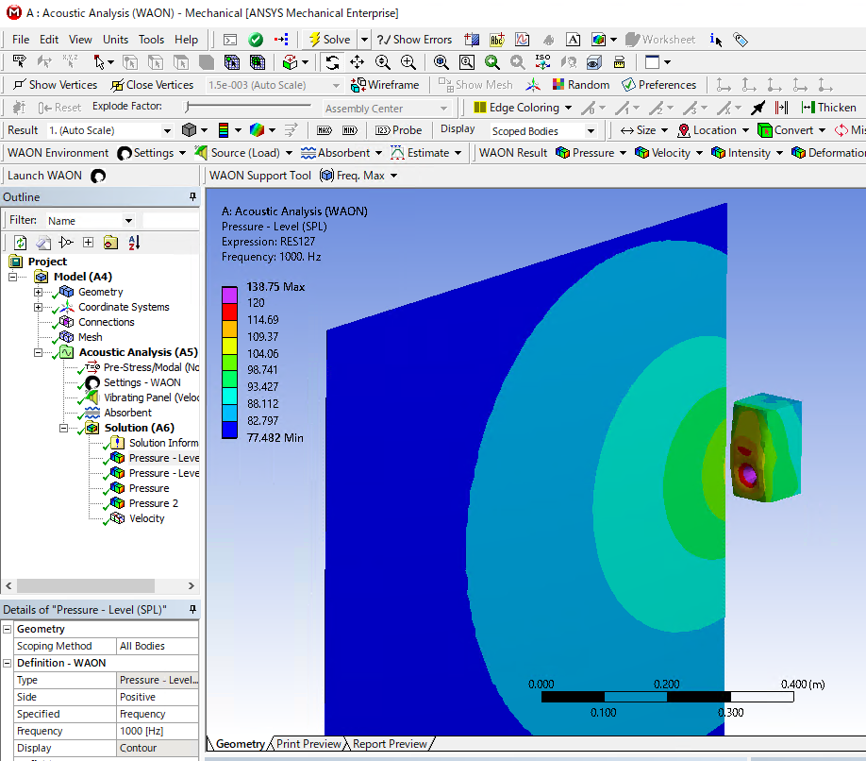
Sound radiation of a speaker
- The results of Harmonic Response Analysis by ANSYS Workbench will become the Sound Source.
- Boundary element mesh and Field point mesh are the exports from the models of ANSYS Workbench.
Boundary Conditions
- Geometry; With thin boundary layers
- Medium; Air (at RT)
- Sound Source; apply the speed to the speaker cone
- Frequency; 2000Hz
Simulation Process
-
Model the Geometry of the speaker cone, the speaker box and the field points with 3D-CAD or ANSYS DesignModeler. Generate meshes of the above-mentioned geometries with ANSYS Workbench Simulation.
-
Execute harmonic response analysis of the speaker cone, which is used as the sound source when doing the acoustic analysis.
-
After the simulation, launch "WBtoWAON" from the ANSYS Workbench toolbar.
-
Define the analysis type (acoustic / acoustic-structural coupled) , the sound source (the result of harmonic response analysis), the boundary element mesh, the field point mesh.
WBtoWAON exports the data from ANSYS Workbench to WAON.
-
WAON automatically launches. All of the boundary conditions necessary for acoustic simulation are already fixed.
You can check the vibrational distribution of the sound source.
-
Select analysis process and the frequency and press the [Execute] button.
You can choose either FMBEM or BEM for the analysis process. FEMBEM is highly effective for large-scale analysis, while BEM is typically used for acoustic simulation.
-
After the simulation choose the mesh and frequency, then press the [Plot-Posi] button to see the result.
System Requirements
- WAON
- ANSYS Professional NLT or above
- Windows 2000 or XP
*Please contact the local sales representative for more details